Time Series Forecasting
Advanced DL models, such as Temporal Fusion Transformers (TFT), are highly effective for complex multivariate time series forecasting. TFT is user friendly in libraries like PyTorch Forecasting or Darts, providing essential functions for plotting and interpreting predictions.
Business case: Time series forecasting with Temporal Fusion Transformer (TFT) in Rossman store sales dataset
Most advanced methods applied on time series include deep learning models, specially for complex multivariate forecasting problems. One of them, the Temporal fusion transformers (TFT), has demonstrated significant performance improvements over existing benchmarks and is currently one of the most accurate methods in forecasting. Although it is an advanced model, its implementation in the pytorch_forecasting library is user friendly and provides all the necessary functions to plot and interpret the model predictions. Besides, if it is combined with tools like tensorboard, tensorflow data validation and featurewiz, we can create a pipeline to prepare, add features and predict data in time series datasets in a flexible and understandable way.
I will show this process using the Rossman store sales dataset, one of the open timeseries datasets available in Kaggle. We are provided with historical sales data for 1,115 Rossmann stores, using not just the sales historical of each store, but information about promotions, number of clients and holidays. Some stores in the dataset were temporarily closed for refurbishment and therefore, we have to clean the data and fill the missing values. The data frequency is daily and we have to predict the “Sales” for some of the stores given in the test set in the next 48 days. This is an interesting and useful AI application field because sellers could take advantage of this kind of predictions during their inventory planning, particularly when a lot of data about products sales and promotions in each store is available.
Technologies used
- Python
- Pandas
- Numpy
- Matplotlib
- tensorflow
- tensorboard
- pytorch_lightning
- Scikit-Learn
- pytorch_forecasting
1. EDA and Cleaning
1.1. Checking data types and missing values
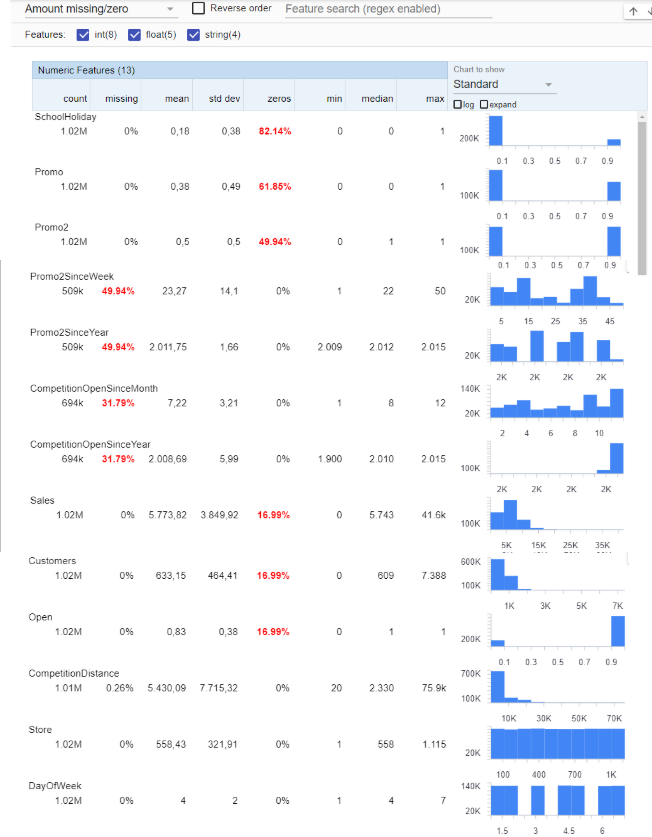
The first step is to import the necessary libraries defined in the requirements.txt file and to download the train.csv and store.csv files as pandas dataframes. Using tensorflow data validation we could check the data type for each column in both Train and Store dataframes, the percentage of zeros, missing values and more statistical information of each column.
For categorical features we can check not just the missing values, but also the Top value and the unique values.
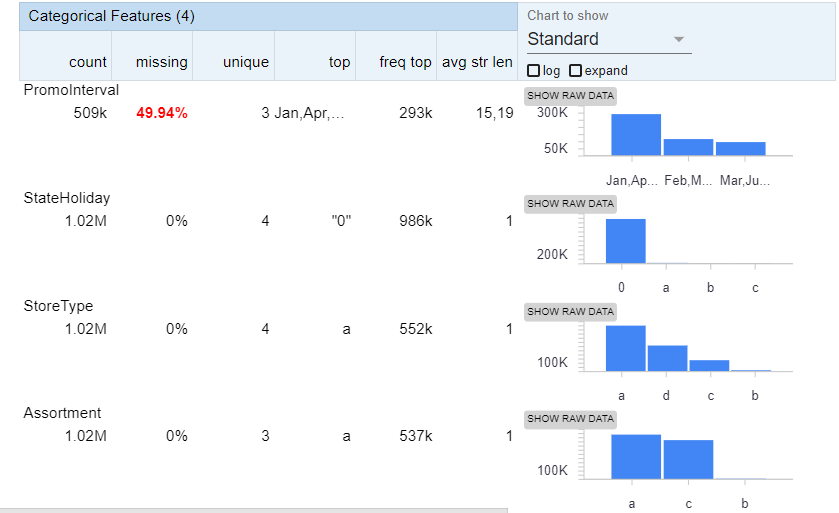
We found that Promo2SinceYear, Promo2SinceWeek, CompetitionOpenSinceMonth, CompetitionOpenSinceYear and PromoInterval have more than 30% of missing values. CompetitionDistance has 0.26% of missing values. We will drop the first two columns and fill the missing values in the CompetitionDistance column to use it as a training feature. We merge the Train and Store dataframes. We check the number of missing values by columns using the next line:
train_data.isnull().sum()
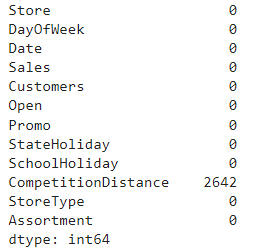
We check that there are 2642 missing values of the 1017209 rows and records. If we look at which are the stores with missing values we find the following 3 stores: [291 622 879].
1.2. Filling missing values
We first fill the CompetitionDistance Null values using the median Competition distance of the other 1112 stores. To do that we run the next line:
train_data.CompetitionDistance=train_data.CompetitionDistance.fillna(train_data.CompetitionDistance.median())
It is necessary to check if a store has more than one Sales record for each unique date and if each date has a sales value for each store, since by default pytorch forecasting timeseries datasets allow missing timesteps but fill them with 0. We use the pandas duplicated, group by and value_counts functions to check the number of days recorded by store.

We found that from 1115 stores, 934 have sales recorded for all the 942 days considered in the train data, while 180 Stores have just 758 sales recorded and 1 has 941 days. We filter the stores that have missing sales values and can plot the historical sales for some of these stores.
train_data[["Date", "Store", "Sales"]][train_data.Store==539].set_index("Date").plot()
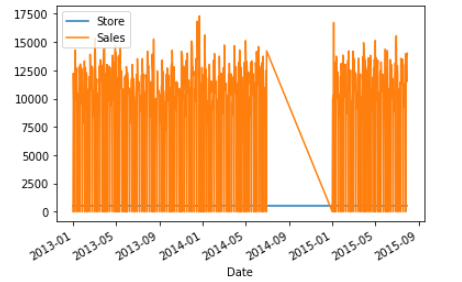
According to the plot, for some reason there were no sales for this store between July, 2014 and january 2015. This was the case for all the 180 stores closed for refurbishment with 184 missing values. We reindex the dates from the start date (2013-01-01) to the end date recorded (2015-07-31) so that all stores have the same dates. After we have expanded the dataset with the missing dates we have 1050330 rows and we check again the columns with missing values.
We impute the empty sales data with the same values of the last year (July 2013-January 2014). For the columns “CompetitionDistance”, “StoreType” and “Assortment” we take the last values of each store, since these are static variables. First, it is necessary to create new columns with the last year sales using the shift function and then we fill the missing sales, customers, open, promo and holidays values with the values of the previous year columns. We plot the sales for the same store after filling:
train_data[["Date", "Store", "Sales"]][train_data.Store==539].set_index("Date")[["Sales"]].plot()
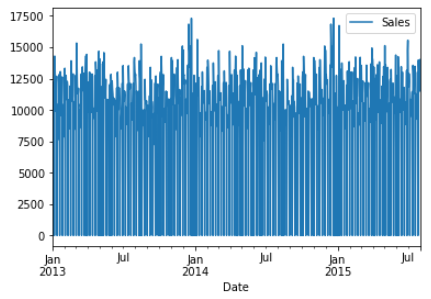
This way we verify that all the stores have all their historical data filled.
2. Preprocessing
The next step after filling and cleaning the data is to normalize the target and to add new features that could help improving the accuracy of the predictions. Since the forecast_horizon is 48 days and we already have the data for each day, we don’t have to resample the dataframe to weekly or monthly sales.
2.1. Scaling
We first scale the sales for each store between -1 a 1 with the min max scaler of Scikit learn. Now if we plot the sales for the same store we see that the range is between -1 a 1.
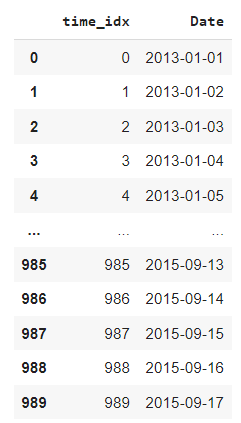
We add a time_idx column necessary for training with temporal fusion transformer, beggining with 0 as the time index for the start date (2013-01-01) and (2015-09-17) as the end date (index 989).
2.2. Create test dataframe
We check if all the stores have the same prediction length for the test data. Then we merge the store columns with the test data and fill the missing values of the Open column using a dictionary for weekdays and weekends.
open_dict={1:1,2:1,3:1,4:1,5:1,6:1,7:0}
test_data.Open=test_data.Open.fillna(test_data.DayOfWeek.map(open_dict))
2.3. Date features
One of the main advantages of TFT is that it supports mixed covariates (includes past covariates known like sales promotions and weather features, and future covariates like temporal features, holidays and StoreOpen column). Therefore, we use the Featurewiz library to add data features like ‘quarter’, ‘is_summer’, ‘is_winter’, ‘dayofmonth’ and ‘weekofyear’, since these features could help the model recognize trends and seasonalities.
data, ts_adds_in = FW.FE_create_time_series_features(data, ts_column, ts_adds_in=[])
3. Training
3.1. Training parameters
We use a dictionary called params_dict to set the training parameters and then we split the data into test and train datasets. TFT implementation in pytorch_forecasting allows us to add categorical features by encoding them with the scikit’s learn default LabelEncoder. To define the timeseries dataset class we have to specify which variables are numerical or categorical and known in the future (like date features or sales promotions) and which are numerical or categorical but unknown in the future (like the number of customers in the store). The test data given in kaggle shows the next 48 days as the prediction interval, so we define our forecast_horizon (decoder length) as 48 and the input_window, wich represents the lenght of the TFT encoder, as 96 days. This means that the model will use a window of 96 days to predict the next 48 days. As a rule it is better to use an input window greater than the forecast horizon.
params_dict={"forecast_horizon":48,
             "input_window":96,
             "batch_size":16,
             "group_ids":["Store"],
             "unknown_reals":["Sales", "Customers"],
             "known_reals":["time_idx", 'Date_quarter','Date_dayofmonth', 'Date_weekofyear'] ,
              "static_reals":["CompetitionDistance"],
             "static_categoricals":["StoreType", "Assortment"],
             "known_categoricals":[ 'Date_is_summer', 'Date_is_winter',"Mes",'DayOfWeek',"Open", "Promo", "StateHoliday", "SchoolHoliday"],
             "target":"Sales",
             "unknown_categoricals":[],
             }
n_stores=data.Store.nunique()
3.2. Create datasets
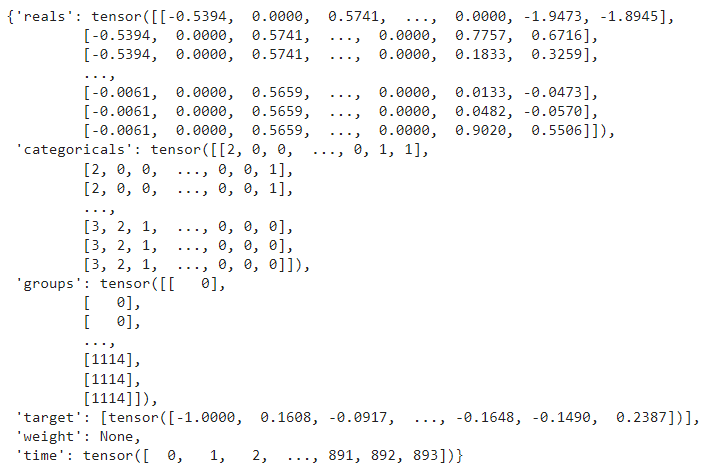
In the main training function, we create the training and validation dataloaders in the pytorch forecasting format and make some baseline predictions. The training_cutoff is the time index where the dataset is going to be split into training and validation sets. In this case, we take the last 48 days as validation dataset and leave the rest days for training. To check if the datasets were configured correctly we can look at the data parameter of each dataset, which is a dictionary that contains the different parameters previously defined as tensors. We check that the last value of the time_idx for the training dataset is 893 in this case.
training.data
We use the baseline model of pytorch forecasting that uses last known target value to make predictions and calculate baseline performance in terms of mean absolute error (MAE):
actuals = torch.cat([y for x, (y, weight) in iter(val_dataloader)])
baseline_predictions = Baseline().predict(val_dataloader)
print("Baseline error: ",(actuals - baseline_predictions).abs().mean().item())
print("Baseline error median: ",(actuals - baseline_predictions).abs().median().item())
Baseline error: 0.3329482078552246
Baseline error median: 0.24794165790081024
3.3. Hyperparameter tuning
We tune the temporal fusion transformer using 50 epochs and 15 trials, using the next possible range of hyperparameters (the ones set by default):
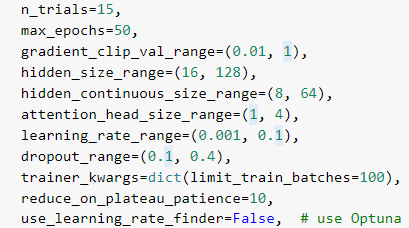
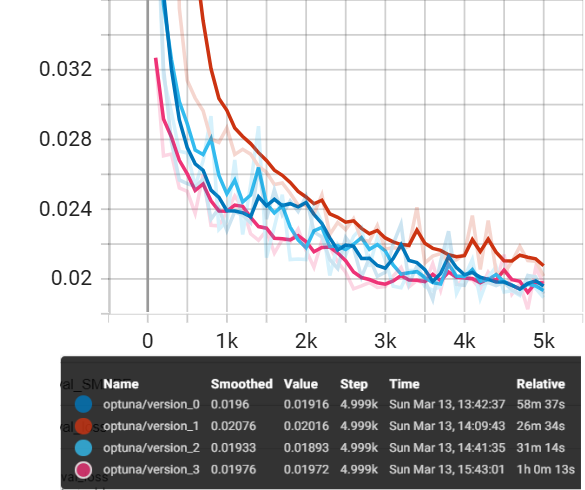
After 3 hours it finishes and with verbose=1 it will show after each trial the validation loss and the hyperparameters used for that trial. The models trained for the epoch with the lowest validation loss are saved in this case in the default folder lightning_logs, but you can use the name you want. For this case, the best 4 models are the first 4, particularly the trial 2 that has a validation loss of 0.01893.
3.4. Predictions on validation data
We load the best model trained using the load_from_checkpoint function at the epoch where the validaion loss was the lowest and we use the predict function in raw mode to get not only the predictions but also the attention given to the time indexes in the validation dataset and the real values for each store sales in this dataset. Besides, we plot the predictions of the validation set vs the real sales for each score and save these plots in the logs folder so we can check the results for each store in tensorboard.
best_model_path="lightning_logs/trial_"+str(study.best_trial.number)+"/"+os.listdir("lightning_logs/trial_"+str(study.best_trial.number))[0]
best_tft = TemporalFusionTransformer.load_from_checkpoint(best_model_path)
# raw predictions are a dictionary from which all kind of information including quantiles can be extracted
raw_predictions,x = best_tft.predict(val_dataloader, mode="raw", return_x=True)
with file_writer.as_default():
  for idx, item in enumerate(data.Store.unique()):
    tf.summary.image("Prediction_"+str(item), preparation.plot_to_image(best_tft.plot_prediction(x, raw_predictions, idx=idx, add_loss_to_title=True)), step=0)
aux=pd.DataFrame(raw_predictions["prediction"].numpy().reshape(n_stores*params_dict["forecast_horizon"] , 7))
Now we calculate the mean absolute error and median absolute error on validation set and compare them with the baseline errors.
print("Error mean: ",(actuals -aux[3].values.reshape(n_stores,params_dict["forecast_horizon"])).abs().mean())
print("Error median: ",(actuals -aux[3].values.reshape(n_stores,params_dict["forecast_horizon"])).abs().median())
Error mean: tensor(0.0690)
Error median: tensor(0.0477)
3.5. Training and validation plots
If you want to check in the notebook the best hyperparameters found during the hyperparameter tuning you just have to execute the next line:
print(study.best_trial.params)

With tensorboard we can also check the hyperparameters and plot the validation and train loss metrics vs each epoch for all the models trained. To open tensorboard in colab, it is necessary to type two magic commands:
%load_ext tensorboard
%tensorboard --logdir lightning_logs
Where lightning_logs is the folder with the training logs defined in the optimize_hyperparameters function. With the help of tensorboard we can compare the validation loss curves for the best four models. In our case the model was the version 2 shown in light blue color. It is also possible to plot the Validation or training MAPE, RMSE, SMAPE and MAE. From this curves we can see that the lowest validation loss is reached close to the 50 epochs or 5000 steps.
We could make the same analysis for the training loss in order to check if the model is overfitting or having some problems while training.
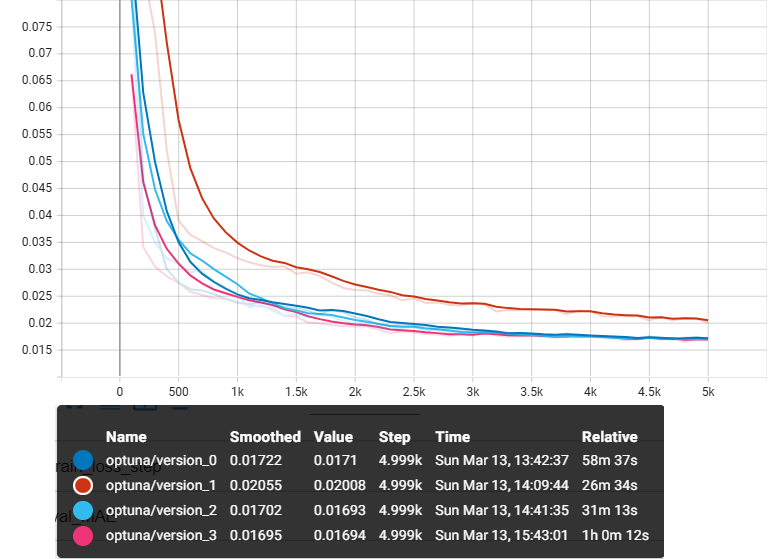
From both validation and training loss curves we see that in both cases the best model is the version_2 model. Both losses improved after each epoch and the gap between the curves at the last epoch is close to 0.002, so we check that the model is not overfitting and that probably we could improve the results by using more epochs and a callback like a learning rate scheduler. Since we are also tuning the learning rate, we could explore the learning rate behavior for each model.
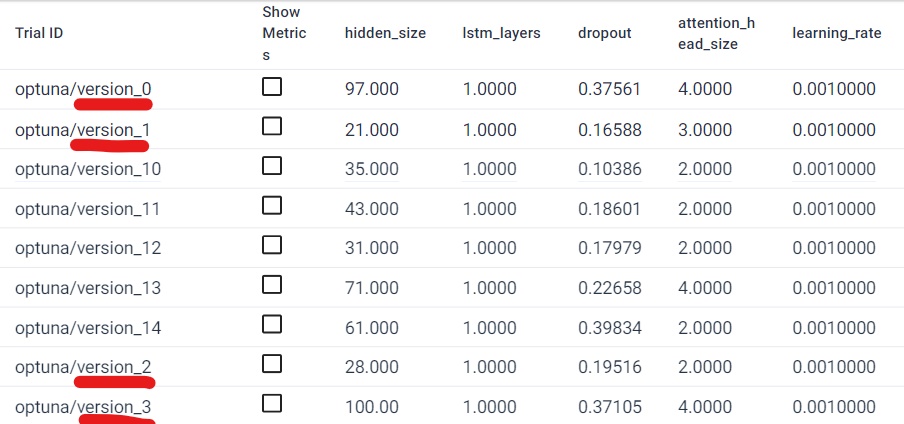
The learning rate remained constant throughout the training for all models, although each one has a different lr value. There is also available a table which compares the TFT hyperparameters used for each model trained, with the four best models underlined in red.
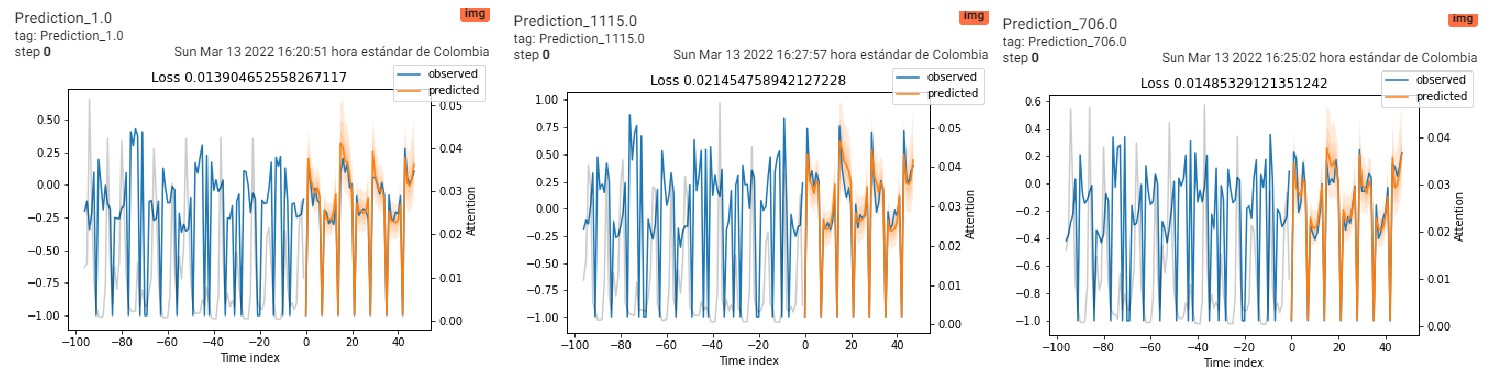
Finally, one of the most important plot we can find in tensorboard thanks to the tensorflow and pytorch_forecasting functions is the validation predictions vs real sales for each one of the stores. We show the predictions for the stores 1, 1115 and 706, where the blue curves are the historical sales and the orange one are the predictions.
From the predictions it can be seen that the model takes into account the days when the stores are closed as well as the trends for each day and week depending on the store. However, for some cases it underestimates sales, probably because the information from the second promotion was not included in the dataset.
3.6. Interpret output
Temporal fusion transformer model has a Variable selection network and with the pytorch forecasting functions we can plot the importance of each Categorical and real feature both for the encoder and decoder. Besides, it has an Attention mechanism that decides which are the most important past time indexes to take into account during training and its plot is also included when we run the next to lines:
interpretation = best_tft.interpret_output(raw_predictions, reduction="sum")
best_tft.plot_interpretation(interpretation)
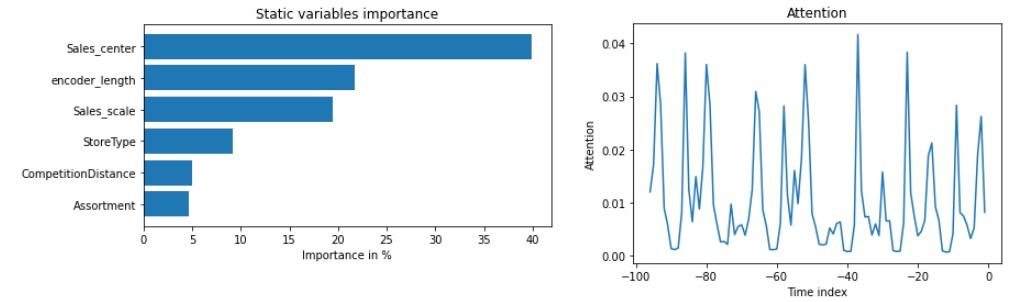
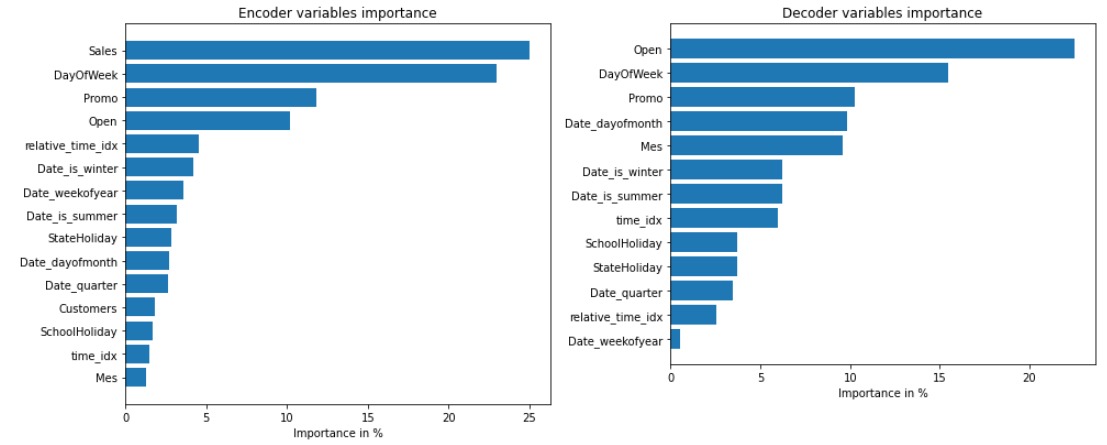
From the first plot, which shows the attention given to each time index in the encoder, we can see which days were the most important in the sales history in general for all the stores. Regarding the encoder features, the most important is the sales columns, followed by the DayOfWeek, promotions and Open, which indicates if the store was open. In the decoder, the most important variables the Open flag, DayOfWeek and Promo columns. This was expected, since it is clear that when the store is closed there are no sales and that these sales depend a lot on the day of the week and promotions.
3.7. Predict on test data
Then we take the same model and predict the sales for the next 48 days and stores defined in the test_data, save them in a dataframe called predict and add the Store and time_idx columns.
raw_test_predictions, x_test=best_tft.predict(test_data, mode="raw", return_x=True)
predict=pd.DataFrame(raw_test_predictions["prediction"].numpy().reshape(n_stores*params_dict["forecast_horizon"] , 7))
predict.columns=["p5","p20","p40","p50","p60","p80","p95"]
predict.insert(7, "Store", np.repeat(data.Store.unique(), params_dict["forecast_horizon"]))
predict.insert(8, "time_idx", np.tile(np.arange(data.time_idx.max()+1,data.time_idx.max()+1+params_dict["forecast_horizon"]), n_stores))
We could plot some of the predictions of the test data as we did with the validation data:
for idx in range(0,2):
    best_tft.plot_prediction(x_test, raw_test_predictions, idx=idx, show_future_observed=False);
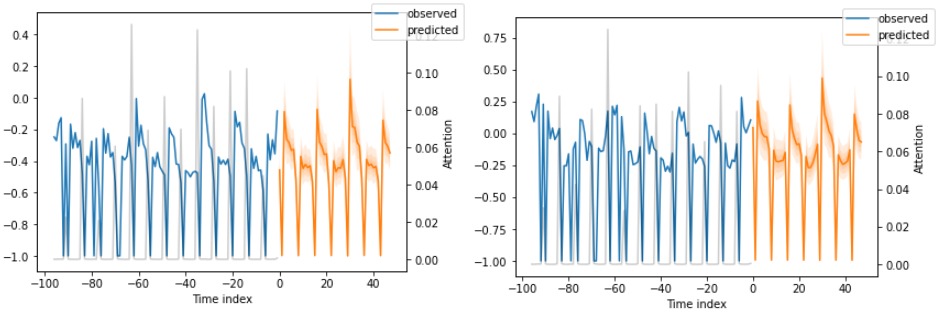
As we can see in the plots, the predictions are also scaled between -1 and 1, so we have to rescale them before the submission in Kaggle. We check now for the first store if the sales values are in the original train data scale.
predict[predict.Store == "1.0"].set_index("timestamp")[["p50"]].plot()
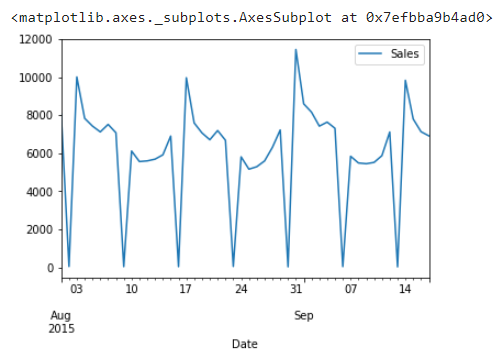
The last step is to clean and format the prediction DataFrame to the sample_submission format given in Kaggle. To do that, we take only the positive predictions and set to zero the ones that are negatives, merge the predict dataframe with the test data Id and make the submission.
4. Future improvements
With the preparation of the data and the training of the model, an accuracy of 0.10573 was achieved in the public test dataset, while the accuracy of the lead team is 0.08932. So this is a very good result and it can be further improved. The process that I explained is only one of the possible ways to prepare and train the dataset, and I explain it and teach it only for academic reasons. There are a few options we can try to improve accuracy:
- Take all the given columns in the Store dataset.
- Fill in the missing sales values in some stores not with the values of the previous year but with the values of previous months or using strategies such as Moving Average.
- Normalize the data using a different strategy.
- Add other external variables that can affect sales.
- Do hyperparameter tuning with more epochs or more trials.